The Channel - a blog for Central Rivers AEA staff and board members 

Our Mission: To Deliver High-quality, evidence-based, and strategic services to our education partners that meet the diverse needs of iowa's learners (birth-21_), educators, and school Communities.

Category: Uncategorized

  • INspired Leadership support will continue

    Central Rivers AEA wellbeing team logo

    All staff are invited to take advantage of 1:1 core energy leadership coaching sessions with Certified Professional Coach, Dr. Leslie Moore, via Zoom. Sessions are designed to enhance your well-being, life satisfaction and assist you in meeting your personal and professional goals. Just book one day in advance – slots are for 60 minutes and can occur anytime between 7:30 am and 4:30 pm on Tuesdays or Thursdays. Book your coaching time now at this link. If you have questions, contact Leslie at lmoore@centralriversaea.org.

  • Flu/COVID-19 vaccination clinics to be offered in October

    Composite image of fight the flu

    The agency is partnering with the Hy-Vee Pharmacy to offer flu and COVID-19 booster vaccination clinics for employees and their families. The vaccination schedule is as follows:

    Friday, October 16

    • Cedar Falls office (Central Perk): 1521 Technology Parkway – 7:30-9:30 am
    • Clear Lake office (Room C): 9184 265th Street, Suite B – 8:00-10:00 am

    Thursday, October 22

    • Marshalltown office (Room F): 909 South 12th Street – 8:00-9:00 am

    Please complete the 2026 registration form if you wish to participate. During the morning of the clinic, remember to bring:

    • A copy of your driver’s license.
    • A copy of your insurance card (front/back).
    • A completed flu shot consent form.
      • Cedar Falls office location only: In lieu of printing off the consent form, Cedar Falls Hy-Vee is providing the option to complete an online consent form. See the link to the online consent form below.
      • Cedar Falls Online Consent Form

    Flu/COVID-19 shots may be covered at no cost to employees and their family members with proof of insurance. Please contact Kevin Klobassa, Benefits Specialist (319-273-8202) with any questions.

  • Doctor on Demand updates

    Having cold or flu-like symptoms? Don’t Forget about Doctor on Demand! Members covered under the Wellmark medical plan have free Doctor on Demand visits. Learn more about the features on the flyer. Reach out to Kevin Klobassa, Benefits Specialist (319-273-8202) with any questions.

  • Your feedback helps shape our collective impact

    At our recent All Staff Meeting, we shared a survey designed to help us better understand what’s working well across our agency and where we have opportunities to strengthen our collective impact. If you haven’t had a chance to complete the survey yet, we’d love to hear from you! Please take a few minutes to share your feedback. 

    As an agency, we want to make sure we’re building on the things that are working, while also being honest and thoughtful about where we can improve. Hearing from staff across teams, roles and experiences will help us identify common themes, understand different perspectives and inform how we move forward together.

    Thank you for taking the time to share your voice and for helping us strengthen our collective impact – together.

  • Legacy & impact challenge

    We’re always looking for ways to celebrate the impact of our work. This year, we will randomly award ten (10) $100 gift certificates from all entries/stories of success shared before Thanksgiving 2026.

    Do you know a student who’s made big strides in their learning or reached a milestone thanks to the support you or your team provided? How about a teacher, administrator, district or building team that’s moving forward due to your influence? Maybe you’ve made an impact with a family or in the community? We’d love to share their story as a way to highlight Central Rivers AEA services and the powerful results they lead to.

    Let’s keep shining a light on the difference we’re making together! For questions, please reach out to Beth Strike, Director of Communications & Creative Services or Contessa Van Buskirk, Communications Specialist.

  • Sign up for agency alerts

    Please be sure that you are signed* up to receive Central Rivers AEA Alerts via text, call or email. Alerts are used to announce agency-related emergency updates, building closings or professional learning cancellations. *If you are already signed up, you do not have to do anything.

    Sign up today at https://myalerts.centralriversaea.org/. If you have questions, please reach out to Beth Strike, Director of Communications & Creative Services.

  • Welcome aboard: meet the newest Central Rivers AEA team members

    We would like to welcome incoming staff for the 2026-27 school year. We are so excited you’re joining our Central Rivers AEA team!

  • New agency norm: turning off AI note-takers & recording bots

    Central Rivers AEA is asking all staff to turn off AI note-taking tools (like the native Zoom note-taker feature, Otter.ai, Fireflies and Read.ai) during agency meetings and professional learning sessions.

    Why We’re Making This Change

    • Intellectual Property: Presenter materials and ideas shouldn’t be captured or re-used by outside AI tools without permission.
    • Privacy: Discussions often involve sensitive details about students, families, and districts that shouldn’t be stored on third-party servers.
    • Psychological Safety: We want everyone to speak candidly and ask questions without fear of being recorded.

    A reminder statement has been added to agency Zoom invites.

    Please note that this guidance does not apply to parents who may activate AI tools during an IEP meeting. Iowa is a one-party consent state (Iowa Code § 808B.2). A parent participating in an IEP meeting may legally record it — including using an AI notetaking tool — without asking AEA staff permission. AEA staff cannot legally prohibit this. Please refer to earlier guidance for details.

    How to Remove a Bot During a Meeting

    If an AI bot joins your Zoom call, host controls allow you to remove it:

    1. Click Participants on your Zoom toolbar.
    2. Find the bot (e.g., “Otter.ai Notetaker”).
    3. Hover over its name, click More, and select Remove.

    Tip: Enabling the Waiting Room feature helps you spot and block bots before they enter.

    If you are the meeting host, you may also want to enable Waiting Room or require host approval for participants joining by video/audio-only link, which gives you a chance to screen for note-taking bots before they enter. Questions? Contact the Central Rivers AEA Help Desk for support.

    Note: These removal steps reflect Zoom’s current host controls. If your Zoom interface differs, look for “Remove” under the participant’s more-options menu, as Zoom periodically updates its User Interface.

  • Artificial Intelligence (AI): What’s new from Google

    Over the summer, Google shipped a steady stream of Gemini updates across the Workspace apps we use every day. None of them are separate tools to learn. Each one is built into a familiar app and does one specific job, such as summarizing the comments on a shared document or building a quiz from a PDF. This issue rounds up the updates that are included in our Google Workspace for Education Plus license and are most useful for our work. Two name changes worth knowing first: NotebookLM is now called Gemini Notebook, and the early-access program formerly called Gemini Alpha is now Gemini Beta.

    How do you use it?

    Each feature below lives in the app named, usually behind the Gemini icon (the sparkle) in the side panel. Gemini features also require that smart features and personalization are turned on for your account. Pick the one or two that match a task you already do this week and try them there first.

    Docs: Let Gemini work through your comments

    Gemini can now read the comment threads on a document, summarize them, pull out what is still unresolved, draft replies, and suggest edits that address the feedback. Edits stay as suggestions until you approve them. You need edit access to the document.

    1. Open a Doc with comments and click the Gemini icon in the side panel, or use the prompt bar at the bottom of the page.
    2. Ask something like “summarize the open comments” or “rewrite the introduction to address Maria’s feedback.”
    3. Review the summary or suggested edits, then accept, adjust, or discard them.

    Docs: Generate and edit visuals

    Ask Gemini to create a diagram, infographic, or image that fits the content of your document, or describe a change to an image that is already there. This works on the web only.

    1. In an open Doc, click the Gemini icon in the side panel or use the bottom prompt bar.
    2. Describe the visual, such as “add a diagram summarizing the three tiers of support at the top of this doc.”
    3. To change an existing visual, select it and describe the edit, such as changing the aspect ratio or matching the document’s style.

    Forms: Build a quiz with Help me create

    Gemini generates a complete quiz, including correct answers and quiz settings, from a prompt and any Drive files you reference. Useful for knowledge checks after a training or for exit tickets.

    1. Open a new Form and choose Help me create.
    2. Describe the quiz and reference source files from Drive (a Doc, Slides, or a PDF).
    3. Preview the quiz, adjust question types or answers, and publish.

    Meet: Find your meeting files without the scavenger hunt

    Meet now files each meeting’s notes, transcript, and recording into a Google Meet folder in the host’s My Drive, with a subfolder per meeting. Attendees with access get shortcuts in their own Google Meet folder. Your old Meet Recordings folder moves inside and is renamed Legacy Meet Recordings. The redesigned Meet homepage on the web also gathers agendas, attachments, and past meeting files in one place.

    1. Open My Drive and look for the Google Meet folder, or open the shortcut in your own Google Meet folder if you were an attendee.
    2. Open the subfolder for the meeting (recurring meetings keep all their sessions together).
    3. Or go to meet.google.com and use the week and month navigators on the homepage to jump to a past meeting and its files.

    Quick tip: If you use the Gemini app (gemini.google.com) on a Mac, press and hold the Fn key to dictate into whatever window is open. Gemini transcribes your speech into clean text at the cursor, drops the filler words, and honors mid-sentence corrections. For staff who think faster than they type, or who rely on speech input, this is one of the more useful accessibility additions of the summer.

    How does it help your work?

    • Saves time: Build a knowledge-check quiz from a handout in minutes, get a first-draft diagram without opening another tool, and let Gemini turn a wall of comments into a short list of what still needs a decision.
    • Keeps you focused: Comment summaries in Docs and the new Meet folder structure cut down on the hunting and scrolling that pulls you away from the actual work.
    • Improves accessibility: Voice dictation, AI-generated first drafts that reduce the blank-page barrier, diagrams that give visual learners another way into a dense document, and one predictable place to find meeting transcripts all lower the effort it takes to participate, whether you use assistive technology or not. Consider these tools alongside the SETT framework when you support a student or colleague who needs a different way to produce or consume information.

    Keep in mind

    Remember that AI is a helper, not a replacement for your judgment. Review every draft, summary, quiz answer, and formula fix before you rely on it or share it. Do not paste identifiable student information into prompts unless the tool is covered by our data agreements. Features roll out gradually, so if you do not see one of these yet, check back in a couple of weeks. You may also read about other new Gemini features this summer, such as full deck generation in Slides, the formula fixer in Sheets, custom edits in Gmail’s Help me write, Ask Gemini in Chat, and slide screenshots in Meet notes. These are not part of our Education Plus license, so you will not see them in your account.

    For more information or questions, reach out to Dr. Tiffanie Zaugg, Assistive Technology/AI Specialist.
  • INspired Leadership support will continue

    Central Rivers AEA wellbeing team logo

    All staff are invited to take advantage of 1:1 core energy leadership coaching sessions with Certified Professional Coach, Dr. Leslie Moore, via Zoom. Sessions are designed to enhance your well-being, life satisfaction and assist you in meeting your personal and professional goals. Just book one day in advance – slots are for 60 minutes and can occur anytime between 7:30 am and 4:30 pm on Tuesdays or Thursdays. Book your coaching time now at this link. Sessions are available starting September 8. If you have questions, contact Leslie at lmoore@centralriversaea.org.

  • Labor Day office closure reminder

    All CRAEA offices are closed on Monday, September 7 in observance of Labor Day.

    All Central Rivers AEA offices will be closed on Monday, September 7 in observance of Labor Day. Please update your voicemail and set an out-of-office email reply to let others know about the closure. All offices will reopen on Tuesday, September 8.

    Voicemail example:

    Hello, this is (your name and title). All Central Rivers AEA offices are closed on Monday, September 7. Please leave your name, number and a brief message and I will get back to you when offices reopen on Tuesday, September 8. Thank you!

    Email responder example:

    Thank you for your email. All Central Rivers AEA offices are closed on Monday, September 7. I will respond to your email upon my return when offices reopen on Tuesday, September 8. Thank you.


    If you need help with either task, please contact the Help Desk at helpdesk@centralriversaea.org or 319-273-8231.

  • Details for the 2026 All Staff Kick Off Meeting are now available

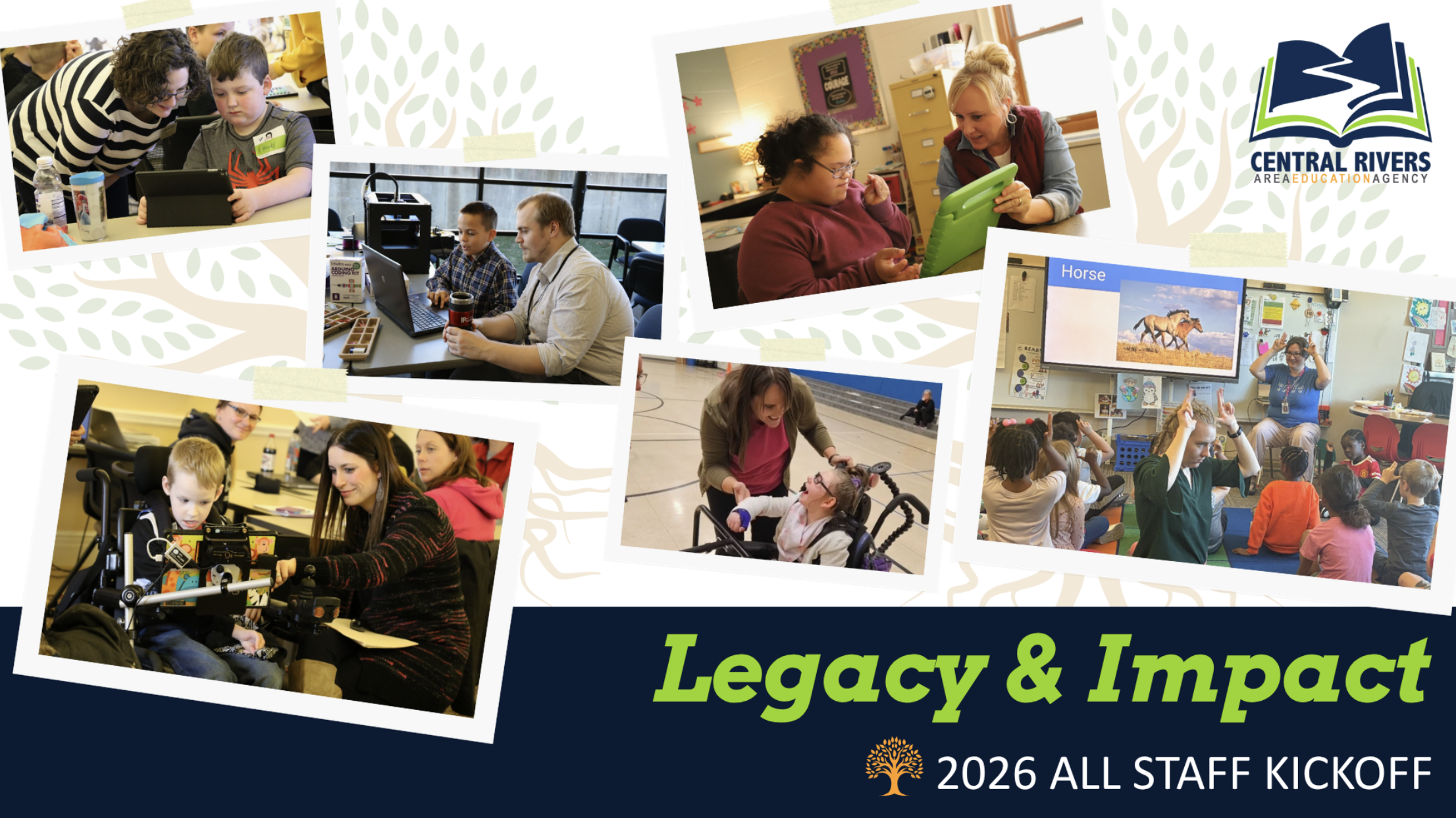
    Legacy & Impact - 2026 Central Rivers AEA All Staff Kickoff

    The 2026 All Staff Kickoff Meeting will be held at the Cedar Falls office beginning at 9:00 am on Wednesday, August 26. This year’s theme is Legacy & Impact. Impact is the immediate effect of your work right now – the teacher you coached yesterday, the family you supported this morning. Legacy is the long-term result of those daily efforts. It isn’t built overnight or created by policy changes; it grows over time through thousands of everyday human connections. Looking back at both our successes and our challenges will give us pride, perspective and a clear roadmap for where we are headed next!

    Schedule for the day

    • Social time: 8:30–9:00 am 
    • All Staff meeting, keynote speaker and service award recognition: 9:00–11:30 am
    • Sector and team meetings: 11:40 am–1:50 pm
    • Discipline and team meetings: 2:00–3:00 pm

    Lunch

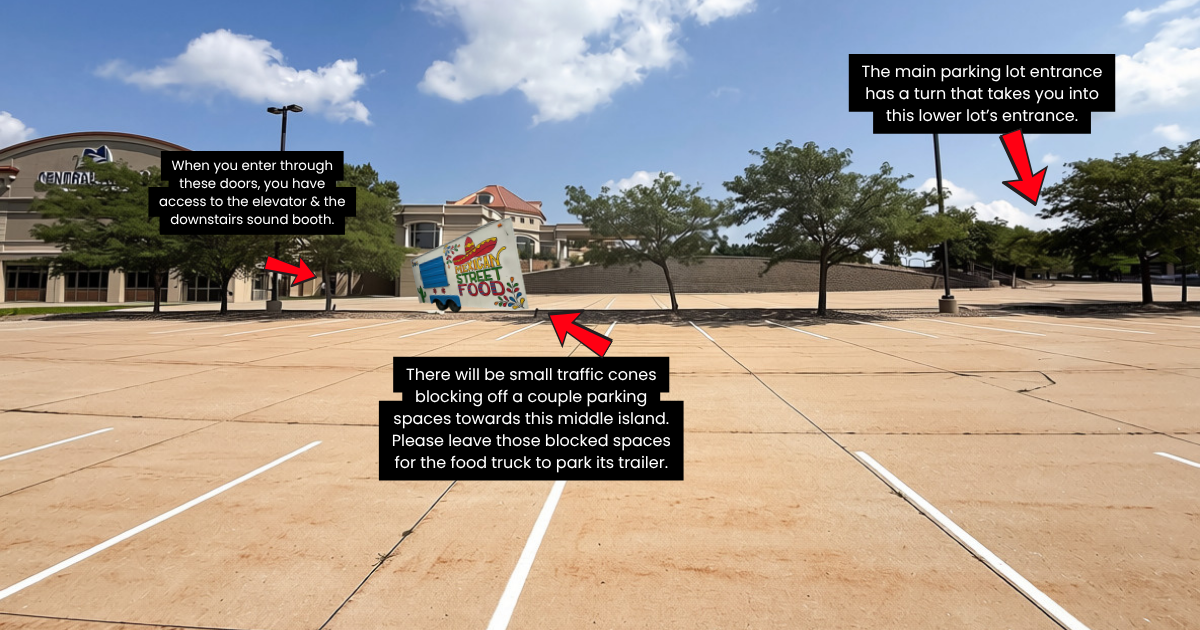
    Lunch will be staggered by team, with some groups starting earlier and others after 12:40 pm. Everyone will have a full hour for lunch, and your teams’ lunch time will be shared during the meeting. Tacos el Pariente will be parked in the lower west parking lot as one option for purchase. (The lower lot is accessed from the main entrance parking lot – this is where you enter the building to get to the elevator or sound booth downstairs). Staff are also free to leave campus and have lunch elsewhere if desired. Thanks for being flexible!

    2026 All Staff food truck parking
    The main parking lot entrance has a turn that takes you into this lower west lot’s entrance. There will be small traffic cones blocking off a couple parking spaces towards this middle island. Please leave those blocked spaces for the foot truck to park its trailer. When you enter through these west doors, you have access to the elevator and the downstairs sound booth.
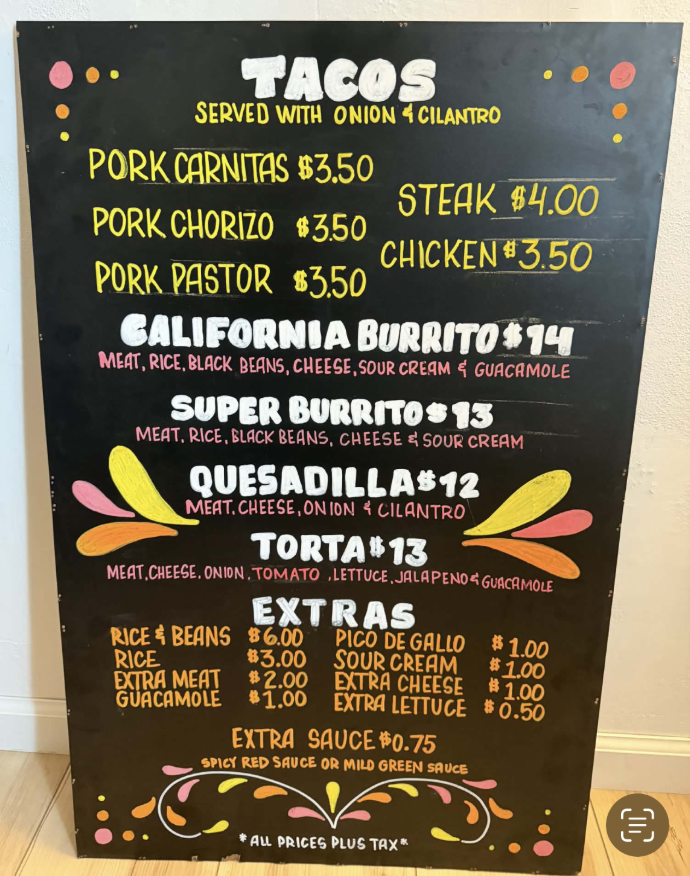
    Tacos el Pariente menu

    Other details

    Additional team-specific logistics will be provided the day of the meeting, including a quick links document that will feature important resources and links you will need. If you have questions, please reach out to your supervisor. We look forward to seeing everyone on August 26 and kicking off another great year at Central Rivers AEA!