Welcome aboard: meet the newest Central Rivers AEA team members

We would like to welcome incoming staff for the 2025-26 school year!

Creative Services welcomes Mark Sabotta, Web Developer/Programmer!

Please give a warm welcome to Central Rivers AEA Creative Services’ newest team member, Mark Sabotta! Mark joined our team on April 13 as a Web Developer/Programmer. He is based out of the Cedar Falls office.
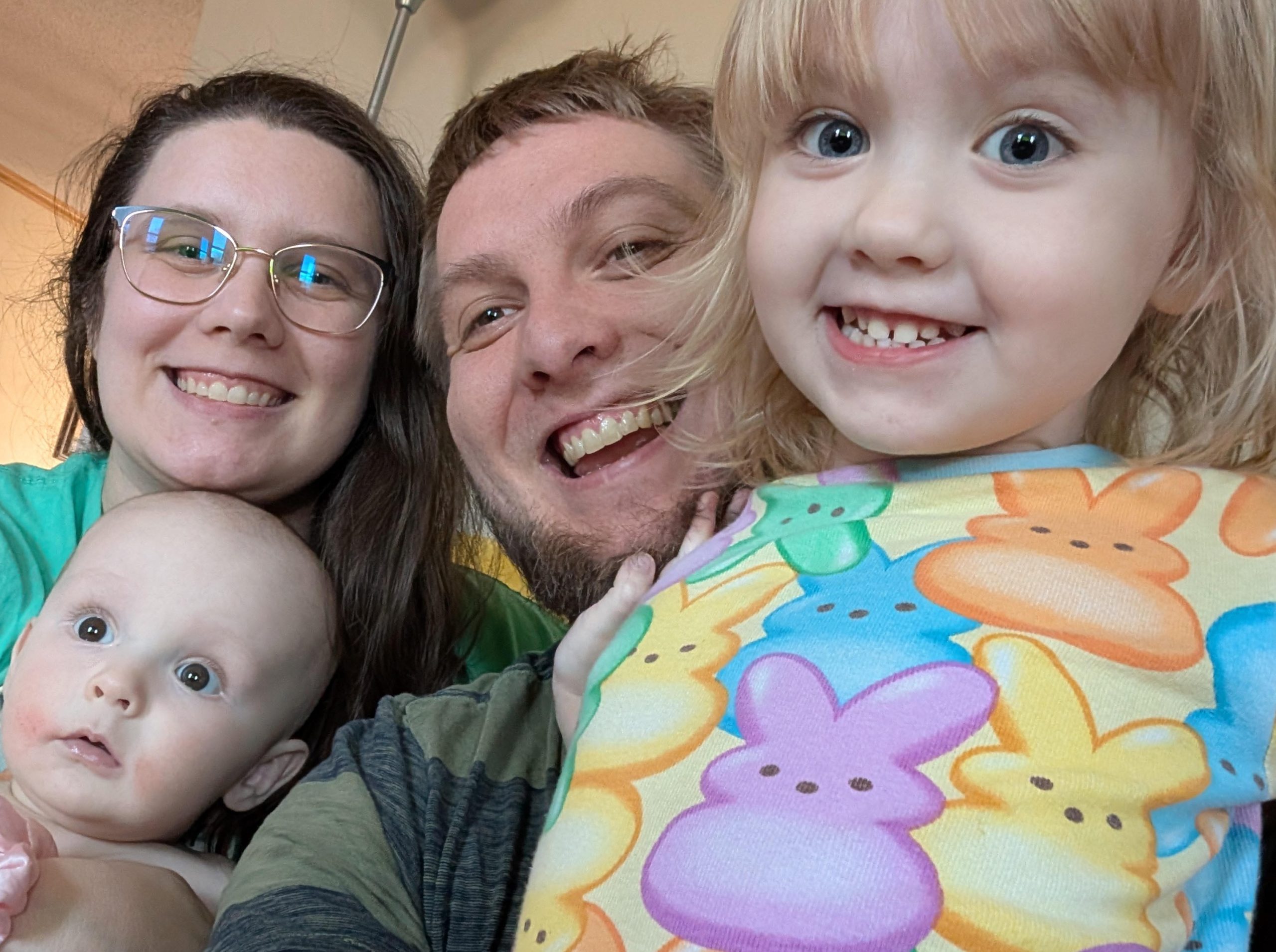
Mark Sabotta, family photo

Hi, everyone! I’m so excited to be working for Central Rivers! I can’t wait to leverage my diverse set of experiences to become an increasingly valuable member of the team. My experiences include eight years of Jr./Sr. High Math teaching for Wapsie Valley CSD, 1.5 years of data mapping for print with Professional Office Services and a couple of degrees in Mathematics from UNI.

I was born in Cedar Rapids and lived there with my two older brothers until we graduated high school and moved away. Since then, I have lived with my wife, Laura, here in Cedar Falls. We have two beautiful children; Margaret who is three, and Larry (Lawrence) who is eight months old.

My hobbies and interests include: talking about my kids (see me for pictures,) chess, video games and Magic the Gathering. Lately, I have been watching Invincible and The Boys, and I am excited to catch up on the last season of Stranger Things. 

I strive to bring energy, willingness to understand, problem-solving, laughter and a smile to everything I do. No matter who you are, I hope we can meet, get to know each other and work together on making the world a better place!


Posted in Uncategorized | Comments Off on Welcome aboard: meet the newest Central Rivers AEA team members

Returning agency-issued tech: What you need to know

Agency tech-related items

If you’re leaving the agency, please make sure to return all tech items issued to you during your employment. This includes:

  • iPads
  • Portable and stationary monitors
  • Presentation clickers
  • Extra laptop chargers
  • Laptop bags
  • Any other related equipment

Where to return items:

  • Cedar Falls office: Help Desk
  • Marshalltown office: Terry Davis
  • Clear Lake office: Front desk

Additional notes:

  • Hotspots: return directly to the Help Desk at the Cedar Falls office.
  • Laptops & chargers:
    • Most staff: Include your laptop with your tech return.
    • River Hills & Youth Shelter/Detention Center staff: return laptops directly to your supervisor.
  • Other items (e.g., fobs, keys): return to HR at the Cedar Falls office or your closest AEA office.

Important: Label each item with your name on a sticky note. If you have any questions, contact the Help Desk or call 319-273-8231.

Posted in Uncategorized | Comments Off on Returning agency-issued tech: What you need to know

What is the Phish Alert Button (PAB) in our Gmail accounts?

Phish Alert Button icon

The Phish Alert Button (PAB) is a powerful tool integrated into your Gmail account that empowers you to report suspicious emails directly to the security experts.

When to use the PAB

Use the PAB for suspicious emails or potential phishing attacks, but not for spam or marketing emails. There is a separate “report spam” button included in your Gmail.

How to use the PAB in three easy steps

The Phish Alert Button appears as a small orange fishhook icon on the right-hand side of your Gmail workspace.

1. Open the suspicious email

If you receive an email that feels “off” – perhaps it asks for a password, has an unusual sense of urgency, or comes from a misspelled domain – open the message but do not click any links or download attachments.

2. Click the PAB icon

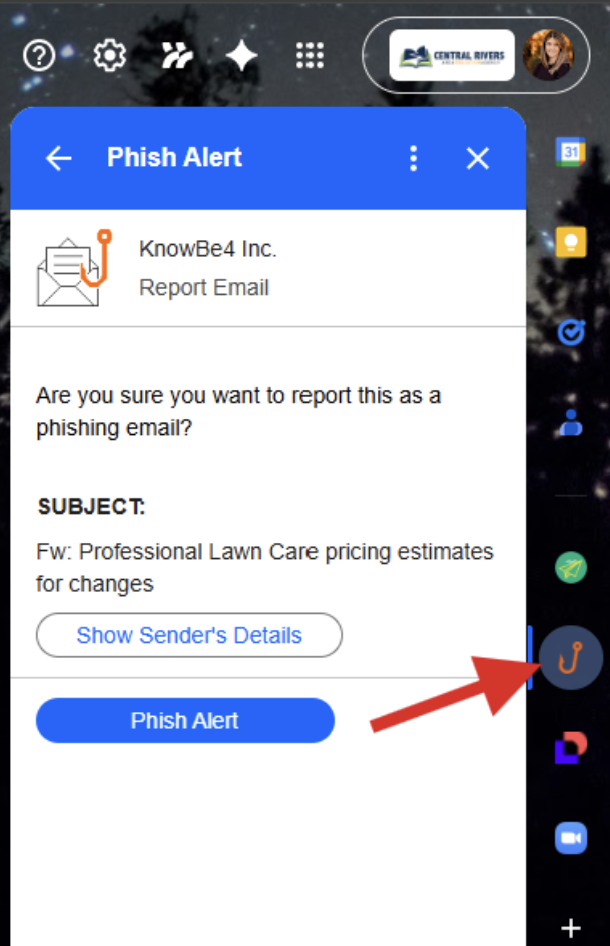
Phish alert example (in Gmail)

Look at the side panel on the right side of your Gmail screen. Click the orange hook icon. Note: If you don’t see the side panel, click the small arrow in the bottom right corner of Gmail to expand it.

3. Confirm the report

A prompt will appear asking if you are sure you want to report the email as a phishing attempt. Click “Phish Alert” to finalize. You will receive a brief “Thank You” message, and the email will disappear from your inbox.

When should you use it?

You should use the PAB if you encounter:

  • Request for Credentials: Any email asking for your login or Multi-Factor Authentication (MFA) codes.
  • Unexpected Attachments: Invoices or “scanned documents” you weren’t expecting.
  • Urgent Threats: “Your account will be deleted in 2 hours if you don’t click here.”
  • Strange “From” Addresses: Emails that look like they are from a colleague but have an external or weirdly spelled address.

Pro tip: If the email turns out to be a legitimate internal security test, using the PAB will earn you a “congratulations” notification!

Posted in Uncategorized | Comments Off on What is the Phish Alert Button (PAB) in our Gmail accounts?

Work smarter, not harder: check out the staff tech hub!

Let’s be honest: technology moves fast, and it can be tough to keep up. That’s why Central Rivers AEA and Keystone AEA teamed up to create the Staff Tech Hub – your go-to cheat sheet for all things digital! Think of it as your monthly “tech upgrade.”

What’s the latest for this month’s tips?

Assistive Tech: Check out our latest guide on academic Chrome extensions and assistive technology, featuring tools like text-to-speech and math supports to help all students succeed. We encourage you to explore these resources to find the best fit for your students’ unique learning styles and needs.

Artificial Intelligence: Google has introduced two new desktop applications, Gemini for Mac and the Google App for Windows, which provide instant access to AI assistance directly from your computer screen. These tools allow you to brainstorm ideas, analyze your screen for contextual help and search for files across your device using simple keyboard shortcuts.

Practical tech tips: Tame your inbox by using Gmail’s Mute feature to move noisy email chains out of your main view so you can stay focused on high-priority tasks. Muted threads are instantly archived and will only resurface if you are specifically added to the “To” or “Cc” line; you can find them anytime by searching is:muted.

The goal isn’t just to give you more tools, it’s to make your daily work easier and more impactful. Ready for more? Head over to the Staff Tech Hub to see the full list of tips and tricks for this month! Reach out to Tiffanie Zaugg, Assistive Technology/AI Specialist, with questions.

Posted in Uncategorized | Comments Off on Work smarter, not harder: check out the staff tech hub!

Updates with Special Education

Live documents, helpful resources and guides can be found on our staff website.

Posted in Uncategorized | Comments Off on Updates with Special Education

Updates with Educational Services & Media

Live documents, helpful resources and guides can be found on our staff website.

Posted in Uncategorized | Comments Off on Updates with Educational Services & Media

What’s new with INspired Leadership?

Central Rivers AEA wellbeing team logo

Microcredential incentive deadline is this month

Central Rivers AEA is offering a $250 incentive to staff members who complete one leadership micro-credential focused on well-being by May 8, 2026. To learn more about microcredentials, review the Micro-credential Explanation document. To learn about and/or register for a microcredential you are interested in, choose and select: 1) Awareness of Internal Energy, 2) 4 Key Mindsets, and 3) Overcoming Internal Energy Blocks [requires both prerequisite microcredentials above]. Evidence submitted will be reviewed by Dr. Moore. If you need to create an account, have questions about microcredentials or aren’t sure how to sign up, contact Kay Schmalen at kschmalen@centralriversaea.org.

Coaching available through May 12

Central Rivers AEA offers free 1:1 coaching sessions with certified well-being coach Dr. Leslie Moore on Zoom. One-hour sessions are available on Tuesdays and Thursdays through May 12, 2026. There is no commitment to more than one session, so check it out if you are curious and want to see how it might benefit you. Schedule your session online today!

Posted in Uncategorized | Comments Off on What’s new with INspired Leadership?

2026-27 All-Staff Kick Off will be held on Wednesday, August 26

Please save the date on your calendar for our All-Staff Kick Off on August 26, 2026. While we are still finalizing the official location and details, we look forward to this time of connection and preparation. Keep an eye on your inbox for a full schedule and official details coming soon!

Posted in Uncategorized | Comments Off on 2026-27 All-Staff Kick Off will be held on Wednesday, August 26

All Central Rivers AEA offices are closed on Monday, May 25

2026 Memorial Day office closure is Monday, May 25

All Central Rivers AEA offices will be closed on Monday, May 25 in observance of Memorial Day. Please update your voicemail and set an out-of-office email reply to let others know about the closure.

Voicemail example:

Hello, this is (your name). All Central Rivers AEA offices will be closed on Monday, May 25 in observance of Memorial Day. Please leave your name, number and a brief message and I will get back to you when offices reopen on Tuesday, May 26. Thank you.

Email “away” message example:

Thank you for your email. All Central Rivers AEA offices will be closed on Monday, May 25 in observance of Memorial Day. I will respond to your email upon my return when offices reopen on Tuesday, May 26. Thank you.


If you need assistance with either task, please contact the CRAEA Tech Help Desk at helpdesk@centralriversaea.org or 319-273-8231.

Posted in Uncategorized | Comments Off on All Central Rivers AEA offices are closed on Monday, May 25