Author: cvanbuskirk

  • Central Rivers AEA Information Technology (IT) department continues “phishing campaign”

    Phishing is the act of sending malicious emails that are designed to manipulate people into divulging sensitive information or installing harmful software. Statistically, phishing emails are the leading cause of data privacy incidents, so it’s more important than ever to equip yourself with the knowledge to identify these malicious messages.

    Phishing is the preferred method of criminals because it is cheap, easy and effective. Central Rivers AEA holds a large cache of sensitive and confidential information, and that data is worth a lot of money on the dark web.

    Recently, we launched a phishing campaign to help educate and train staff on how to identify and report phishing attempts.

    • This is part of an educational initiative of simulated phishing attacks to help staff take appropriate action and minimize organizational risk in a safe environment.
    • The phishing campaign will give Central Rivers AEA an opportunity to test all staff members and gain valuable metrics to assist with reducing failure rates.
    • Threats are evolving and becoming much harder to detect, so there is absolutely no shame in falling for a simulated phishing attack!
    • The goal is to empower our staff with the knowledge and confidence in identifying and reporting phishing messages.

    Let’s take a look at our most recent phishing campaign and some common “red flags.”
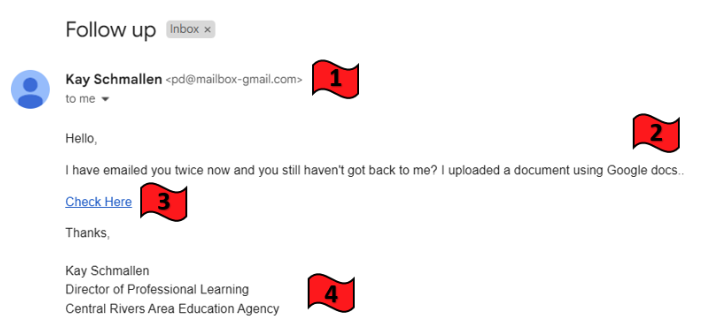
    Suspicious email

    1. Do you know the sender? Is the name spelled correctly? Does the email address look strange?
    2. Does it urge you to take action? Are there spelling and/or grammatical errors?
    3. Did you hover over the link? Does it take you to known and/or expected content?
    4. Should there be an official agency signature here?

    Now, let’s take a deeper look at the details of the email message…Suspicious email details
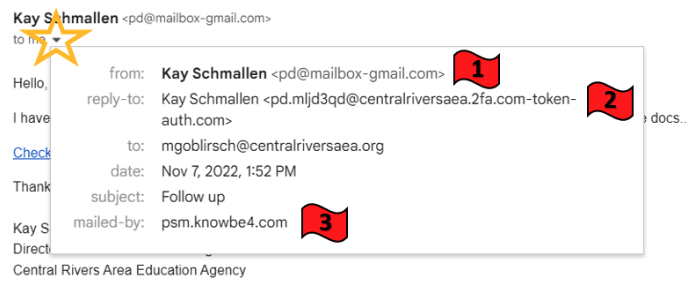
    1. Double-check the sender’s name and email address.
    2. Double-check the sender’s reply-to email address.
    3. Double-check the mailed-by provider address.

    If you happened to click the link, you would have been prompted to enter your credentials:
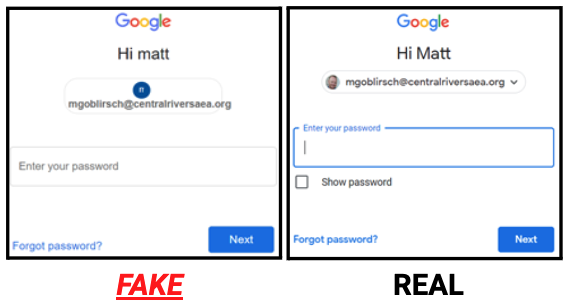
    Real versus fake credentials prompt

    The fake message web address also included “secured-login.net”, not the actual Google-affiliated address “accounts.google.com” when hovering over the links.

    Let’s break down the statistics…

    Phishing campaign statistics

    Take some time to review the message and search for any of the five common red flags:

    1. Message is unexpected or oddly timed.
    2. Message contains odd spelling or grammatical errors.
    3. Message urges actions like clicking links or opening attachments.
    4. Message appears to be time sensitive or threatens consequences for inaction.
    5. Message is requesting money or personal information.

    When you receive any suspicious communications: Stop and think before you click! If you suspect a phishing email, please contact the Help Desk at 319.273.8231 or helpdesk@centralriversaea.org to verify the email’s validity.


  • Central Rivers AEA “Thank You” storefronts close December 31

    A reminder that staff have the opportunity to personally choose and purchase a “Thank You” Central Rivers AEA branded apparel item until December 31. There are two storefronts set up for this promotion; One site is preset with $30 items only and will be charged straight to the agency for each order. The second site will allow those who want to shop for little higher-end merchandise to use the $30 “THANKYOU” code voucher and your own credit card to make a purchase. Instructions to access the storefronts can be found below:

    1. Visit the CRAEA staff intranet.
    2. Go to the Business Office/HR page.
    3. Select the Central Rivers AEA “Thank You” Storefront page.
    4. Choose one of the two catalogs to shop from (read the page for web store details e.g. – tax-exempt vs. non-tax-exempt).

    For more information, please see the FAQs for CRAEA “Thank You” storefront document or contact Jenny Young, (jyoung@storeykenworthy.com) our apparel account representative.

  • What’s new with INspired Leadership?

    Central Rivers AEA wellbeing team logo

    INspired Leadership Staff Survey
    Thank you to the over 300 Central Rivers AEA staff who have shared your needs and preferences regarding INspired Leadership opportunities. If you haven’t yet been asked or had the opportunity to respond to this brief survey, please do, as it will shape the content and delivery of future learning options.

    As a reminder, the purpose of INspired Leadership is to increase our self-awareness of how we are “showing up” so that we can make conscious choices that help us achieve our personal and professional goals.

    INspired Leadership Insights
    With high self-awareness and intention, we can experience fear-based catabolic energy (which is totally normal and typical) and yet respond in ways where we lead with a more conscious anabolic energy. When we notice and become aware of our own energy, it’s more likely we will pause and make choices that serve us in that moment. Remember, catabolic energy isn’t good or bad, it just is. It may lead to emotions we’d rather not feel, but emotions are data, and what we do with them is up to us. Awareness helps expand our options for action!

  • Remember to change your voicemail/email message for the holiday breaks

    Happy Holidays! All Central Rivers AEA offices closed December 26 - January 2 for Holiday Break.

    Don’t forget to change your voicemail greeting and schedule an “away” message to your email during the Christmas holiday break so that callers and/or e-mailers will know when they can expect to hear from you. All Central Rivers AEA offices will be closed on December 26-January 2 for the holiday break.

    Voicemail example:
    “Hello, this is (your name). Our office will be closed beginning Monday, December 26 and will reopen on Tuesday, January 3. Please leave your name, telephone number and a brief message and I will return your call on the third. Thank you and have a safe and happy holiday season from all of us at Central Rivers AEA.”

    Email “away” message example:
    Thank you for your email. I will be out of the office beginning Monday, December 26 and will respond to your email upon my return when offices reopen on Tuesday, January 3. Thank you and have a wonderful holiday season!

    If you need assistance with either task, please contact the Help Desk at helpdesk@centralriversaea.org or 319-273-8231.

  • Register for weather notifications

    *(If you are already signed up, you do not need to do anything.)
    With winter almost here, be sure you are signed up to receive Central Rivers AEA weather alerts via text, call or email regarding office closings or professional learning cancellations.

    Staff members can contact Shirley Horak, Human Resources Coordinator, for assistance with signing up.

  • Branding Tips: Did you know that Central Rivers AEA has approved fonts?

    Anything created by Central Rivers AEA employees should follow branding, copyright and accessibility guidelines, including using the CRAEA approved fonts. The approved fonts are:

    • Abadi MT Condensed Extra Bold and Arial Narrow when possible.
    • You can also use Times, Open Sans or Garamond.
    • *Do not use “cute” or decorative fonts like Chalkboard, Papyrus, calligraphy or handwriting fonts for brochures, newsletters, calendars or email signatures.
    • You may use decorative fonts for flyers or materials for extracurricular activities.

    Also, the colors we use matter! The approved colors are:

    • Primary blue (#001e5f)
    • Primary orange (#fa9e0d)
    • Primary green (#94d500)
    • Primary gray (#666366)
    • Secondary blue (#45637a)
    • Secondary orange (#c68627)
    • Secondary green (#638f38)
    • Secondary gray (#e2e1dd)

    *Important to note: The exception to the rule would be if colors were following the branding of another purpose or organization (ie. Next Generation Science Standards (NGSS) or The New Teacher Project (TNTP). Check out and bookmark this slideshow for everything on Copyright, Branding and Accessibility. Please contact Beth Strike, Director of Creative Services/Communications or Contessa Van Buskirk, Communications Specialist, with any questions.

  • Want to learn a new Google Sheets shortcut?

    Ben Collins, Google Developer Expert & Data Analytics Instructor teaches Google Sheets and Google Docs tips. This paste special tip works for Google Docs, Slides and Drawings.

    Google Sheets Tip #229: Paste Special

    You’re probably familiar with the copy-and-paste shortcuts (Ctrl + C and Ctrl + V). Paste Special takes that a step further by letting you perform an operation as you paste the data. Majority of the time, paste data as values only is used, which removes any underlying formulas and the formatting. To paste as values, use the shortcut keys:

    • Ctrl + Shift + V on PC/Chromebooks
    • Cmd + Shift + V on Macs

    It’s a universal shortcut that works elsewhere too. It’s useful when copying from one place to another, for example, if you want to copy a table from a website into a Google Sheet without all the formatting issues.

    Other Paste Special Operations
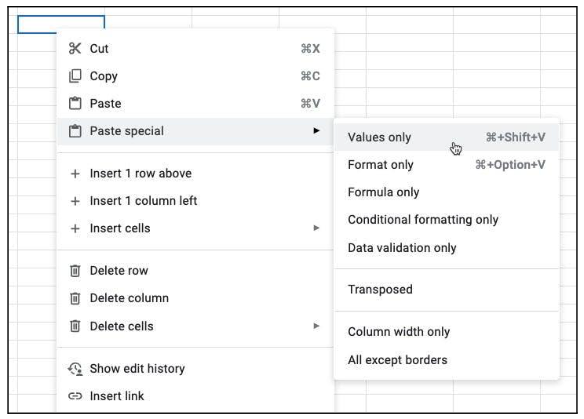
    Paste special is more powerful than just pasting values. Right click in Google Sheets to bring up the menu. Hover over “Paste special” and you’ll see the different operations you can perform on data you’ve copied to the clipboard:

    Right click in Google Sheets to bring up the menu. Hover over "Paste special" and you'll see the different operations you can perform on data you've copied to the clipboard.

    For more weekly Google tips, sign up for Ben Collins’ newsletter.